Every enquiry answered. Every lead followed up. Every source tracked.
Zentri AI gives your practice an AI receptionist that answers your calls, a website chatbot that never clocks off, and a CRM that turns each enquiry into a lead your team can book. One platform, built for UK dental practices.
Why practices choose Zentri
Never miss an enquiry.
Calls, website chat, forms, WhatsApp, Messenger, Instagram and Facebook Lead Ads all land in one place, with the conversation attached.
Answer in the moment, day or night.
Zentri Voice AI and Zentri Assistant each answer from a knowledge base you write: your treatments, your prices, your rules, your tone.
Know where your leads come from.
Website leads are tied to the channel and visit that produced them, using the same channel names as Google Analytics.
Follow-up that runs itself.
Welcome emails, texts, reminders and multi-step sequences start when a lead arrives. Move the lead on and its status sequence stops.
Show the smile before they book.
Smile Assessment gives patients an AI-generated preview of how their smile could look, from your website chatbot or chairside in the CRM.
Fits the tools you already use.
Connect your website forms, WhatsApp Business, Facebook, Instagram, Google Analytics and partner practice software and phone systems.
Zentri CRM
The dental CRM that gets your team to the right patient, fast
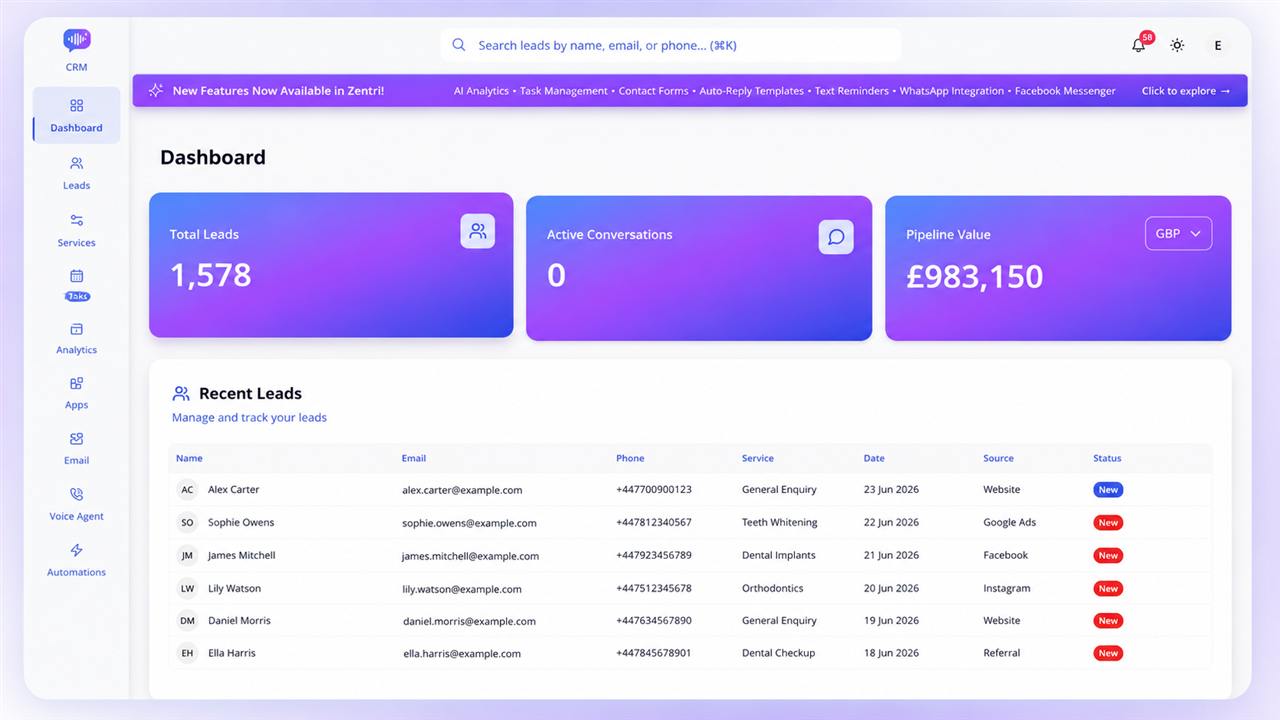
Every lead, every conversation and every number in one clean workspace. Built so receptionists can run it without training and owners can run the practice from it.
One record per lead
with contact details, service, value, status, attribution, conversations, notes, files and tasks.
One conversation timeline
for chat, email, WhatsApp, Messenger, Instagram and SMS.
A pipeline built on your statuses,
with lead count and total value on every column.
Follow-up on autopilot,
with service workflows, status sequences and quiet hours.
Everything in the CRM
The dashboard, lead records, conversations, pipeline, services, tasks, duplicates, and import and export.
One dashboard, the whole picture
Total leads, active conversations and pipeline value (by currency), each with change against the previous period.
Monthly leads and conversions.
Recent leads, upcoming tasks and recent activity.
Every lead, one complete record
Contact details, service, value and currency (GBP, EUR, USD), status and location for multi-site groups.
Lead source and marketing attribution
side by side.
Call transcripts
attached to leads that came from a call.
Facebook Lead Ad answers
on their own tab.
Notes, files and tasks.
Smile photos can be previewed and downloaded.
Share a lead into team chat
with a single click.
Ask for a Google review
straight from the lead.
Smile Assessment workspace.
Upload a photo, compare before and after, and email the preview to the patient without leaving the CRM.
A unified conversation timeline
Chat, email, WhatsApp, Facebook Messenger, Instagram and SMS in a single thread per lead, filterable by channel.
Reply without switching tabs
on email, WhatsApp, Messenger and Instagram.
Email with open tracking,
with templates (including service-specific ones) built into the composer.
WhatsApp template messages
for approved outreach.
A pipeline your team will actually use
Drag-and-drop board
with one column per status, and lead count and total value on every column.
Search and filter by source, marketing channel and imported leads.
Fully custom statuses:
names, colours, order, and a stage (new, active, won or lost). Apply a status to every service or only some.
Won and lost stages power your win-rate and pipeline reporting.
Services that drive everything
Set up each treatment with a name, price, currency and icon.
Services flow through your sidebar, pipeline, chatbot flows, automations and analytics.
The price is stored on every lead.
Tasks and follow-up that keep patients moving
An account-wide task list with Overdue, Today, Last working day, Upcoming, Completed and Incomplete views.
Priorities, due dates and snooze, with every task linked to its lead.
Last working day
follows your business hours.
Guided follow-up logging:
discuss later, no answer, wrong number or successful contact (with appointment date and time). Each outcome sets the next status and creates the next task.
Open-task count in the sidebar and upcoming tasks on the dashboard.
Smart duplicate protection
Checks every new lead except CSV imports, matching email, phone, or name where contact details do not conflict.
Held for review.
Flagged leads do not trigger welcome emails, texts or automations until you decide, but your staff are still notified.
One-click resolve.
Mark "not a duplicate" or merge: keep the older lead, choose the best fields, and bring across notes, conversations and files.
Import and export
CSV import
with a template, a preview and a duplicate count before anything is imported. Source labels are mapped to known channels, and imported leads never trigger welcome messages.
CSV export
of your current filters, including both how the lead got in touch and where the visit came from.
Automation: follow-up on autopilot
Two engines, service workflows and status sequences, with one set of quiet hours.
Service automations
Visual workflows, one per service.
Triggers:
lead created, status changed, field updated or manual.
Steps:
send email, send SMS, wait, add conditions, call a webhook or end.
Smart waits:
for a set time, until a date or condition, and optionally only within business hours.
Conditions
on status, service, source, name, email or phone, matching all or any rule.
Webhooks
to any system, with a custom method, headers and body.
Activate, pause, duplicate and test any workflow, or start from ready-made defaults.
Every run records its emails, texts, webhook calls, conditions and waits.
Status automations
Sequences of up to 20 steps (emails, texts and waits) that start when a lead enters a status for a service.
Move a lead on and the old sequence stops while the new one begins.
Each step keeps its own copy, so editing a template never changes a sequence already live.
Switch sequences on or off in one click.
Quiet hours for everything
Set a start time, end time and timezone. Any message due inside that window is held until it ends, across both automation engines.
Email and SMS built for patient communication
Email
Send from the lead, reply in the thread, and see incoming email threaded onto the lead automatically.
Open and click tracking.
Your sender name, address and signature, with your own domain connected.
Template library
by category (welcome, follow-up, service-specific, custom and Google reviews), with a default per category.
Personalisation:
name, email, phone, service, status, business name, business phone, website, date and time.
Google review requests
from the lead or in bulk.
Daily send limits, and anyone who has unsubscribed is never emailed.
A master switch and per-source exclusions for automatic messages.
SMS
Automatic welcome text
to new leads when SMS is switched on. Imported leads, leads held as duplicates and sources you exclude are skipped.
SMS steps inside any automation.
Service-specific templates.
Booking-link texts after voice calls, when a booking link is set.
Opt-out requests recognised automatically and not counted as replies.
SMS alerts to the business for new leads.
Analytics that show what's working
Lead, attribution, messaging and automation reporting, with the leads behind every number.
Lead analytics
Cohort reporting:
leads created in any range and where they stand today, compared with the previous period.
Won count, win rate, close rate, won value and open pipeline value.
Speed-to-lead:
median and average time to first response, response bands from under 5 minutes to over a day, and how many leads are still waiting. Once you turn on opening hours, only business hours count.
Breakdowns
by source, marketing channel, ad campaign and location.
Click any number
to see the leads behind it.
Website traffic on the same page:
sources, devices, landing pages and referrers from Google Analytics.
Marketing attribution that goes further
Know where each website visit came from, separate from which Zentri channel captured the lead.
Recorded on website leads:
the Zentri chatbot, Zentri forms, and any other website form that carries the hidden reference field.
First visit and latest visit
captured, with the first visit kept for 90 days.
Channel names match Google Analytics:
Paid Search, Paid Social, Organic Search, Direct, Referral, Email and more.
AI Assistants channel.
See leads referred from ChatGPT, Perplexity, Claude, Gemini, Copilot and other AI tools.
Ad click identifiers stored with the visit.
Leads are always saved, even when the origin cannot be read.
Rules run on the server, so existing leads can be reclassified when the rules change.
Email and SMS analytics
Sent, delivered, opened, clicked, replied, bounced and failed.
Split by welcome, follow-up, automation, template and hand-written.
Leads messaged and replied, with trends and the leads behind every number.
Automation analytics
Runs started, completed, cancelled and failed.
See which sequences were running when leads moved to won or lost.
How far leads progress through each sequence, and which runs are overdue.
Built for your whole team
Roles:
managers get full access; receptionists get leads and tasks, with analytics and trash hidden.
Team chat
with a group channel, direct messages and unread counts.
Lead cards in chat
showing name, source and last updated time.
Notifications:
new-lead alerts by email and text, and in-app alerts for leads, tasks, notes, failed emails and quota warnings.
Activity log
recording lead changes, duplicate flags, merges, emails sent, automations and restores.
Trash
with restore and permanent delete, and automatic clear-out after 30 days.
Business hours and holidays
for each day of the week, driving task filters and response-time reporting.
Multi-location support
with location on every lead and in reporting.
Light and dark themes.
Zentri Chatbot
Turn website visitors into leads, 24/7
Embed one script and your website starts capturing enquiries around the clock. Every conversation becomes a lead in Zentri CRM with the full chat attached. Choose the level that suits your practice.
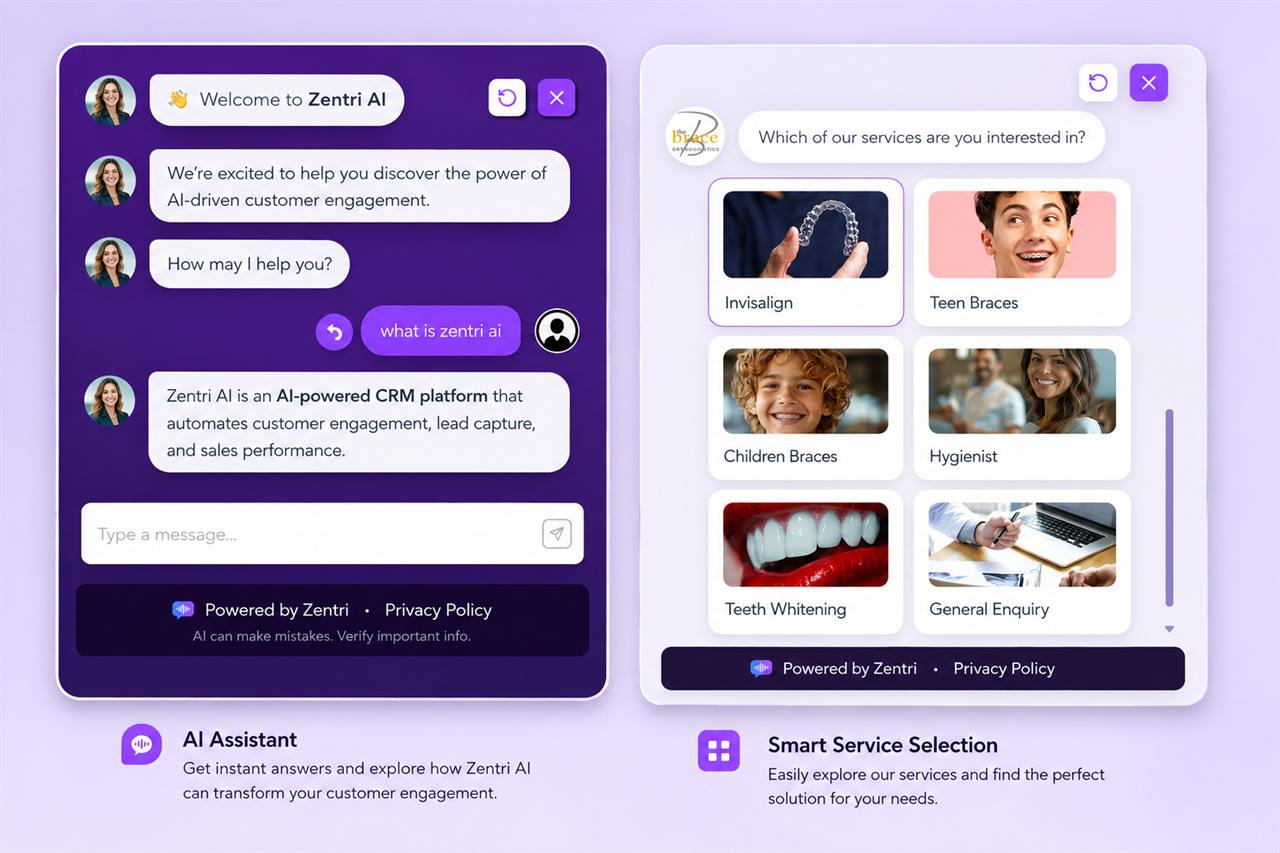
Compare Express, Engage and Assistant
Express
Fast, simple lead capture
- Scripted buttons and guided fieldsIncluded
- Lead capture into the CRMIncluded
- Visual drag-and-drop builderNot included
- Images, carousels, video and embedsNot included
- Full theme and brand stylingNot included
- Smile AssessmentNot included
- AI answers from your knowledge baseNot included
- Automatic service detectionNot included
Engage
A branded, visual experience
- Scripted buttons and guided fieldsIncluded
- Lead capture into the CRMIncluded
- Visual drag-and-drop builderIncluded
- Images, carousels, video and embedsIncluded
- Full theme and brand stylingIncluded
- Smile AssessmentIncluded
- AI answers from your knowledge baseNot included
- Automatic service detectionNot included
Assistant
Answering real questions, automatically
- Scripted buttons and guided fieldsIncluded
- Lead capture into the CRMIncluded
- Visual drag-and-drop builderIncluded
- Images, carousels, video and embedsIncluded
- Full theme and brand stylingIncluded
- Smile AssessmentIncluded
- AI answers from your knowledge baseIncluded
- Automatic service detectionIncluded
Included with every tier
One-line install.
Paste a single script tag. Step-by-step guides for WordPress, Wix and Shopify.
Opens how you want:
on click, after a delay, or on its own.
On-brand:
your colours, avatars and font.
Collects name, email, phone, service and the enquiry,
then creates the lead with the conversation attached.
Built-in analytics
for every chatbot.
Everything in each tier
Smile Assessment is available on Engage and Assistant, and inside Zentri CRM.
Zentri Express: simple, fast, reliable
A list-based builder for scripted conversations. Set up your states, option buttons and validated fields in minutes. No design work required.
Zentri Engage: a chat experience that looks like your practice
Visual canvas
with drag-and-drop states, a minimap, a validation panel and live preview.
Rich messages:
text, single images, image rows, or auto-scrolling carousels.
Options as bars or cards,
with icons, images, links and redirects.
Action buttons
and iframe or video embeds.
Photo upload step
for patients to share a picture.
Footer contact buttons
(up to three): phone, email, link, map, calendar, WhatsApp, Facebook and Instagram.
Branching logic.
Send each option down its own path.
Total design control:
a six-colour theme, corner radius, font size, shadows, and transparent, glass or solid backgrounds, plus animation, typing and message timing.
Flexible capture:
name, email, phone, service, location, privacy acceptance or custom fields, with the option to require privacy policy acceptance.
Flow control:
mark any step as the end and choose whether it submits the lead.
Zentri Assistant: Engage, plus an AI that knows your practice
Everything in Engage, plus a conversational AI step that answers from the Assistant knowledge base.
Visitors ask in their own words.
Answers come from your business content, not guesswork.
Your voice.
Custom instructions shape how the AI speaks.
Searchable knowledge base
organised into sections, saved and synced. It is separate from the Voice AI knowledge base.
Smart hand-off.
After a set number of turns the chat moves into lead capture, so conversations end with contact details.
Automatic service detection.
The conversation is matched to one of your services and stored on the lead.
Admin control.
AI steps can be switched off account-wide.
Chatbot analytics
Opens, engagements, enquiries and button clicks.
Conversion funnel:
opened, then engaged, then enquiry.
Daily, weekly and monthly trends, with day-and-hour heatmaps.
See which buttons patients click.
Chatbot visitors by traffic source and device, through Google Analytics.
Everything compared with the previous period.
Smile Assessment
Show patients the smile they could have, on your website or chairside
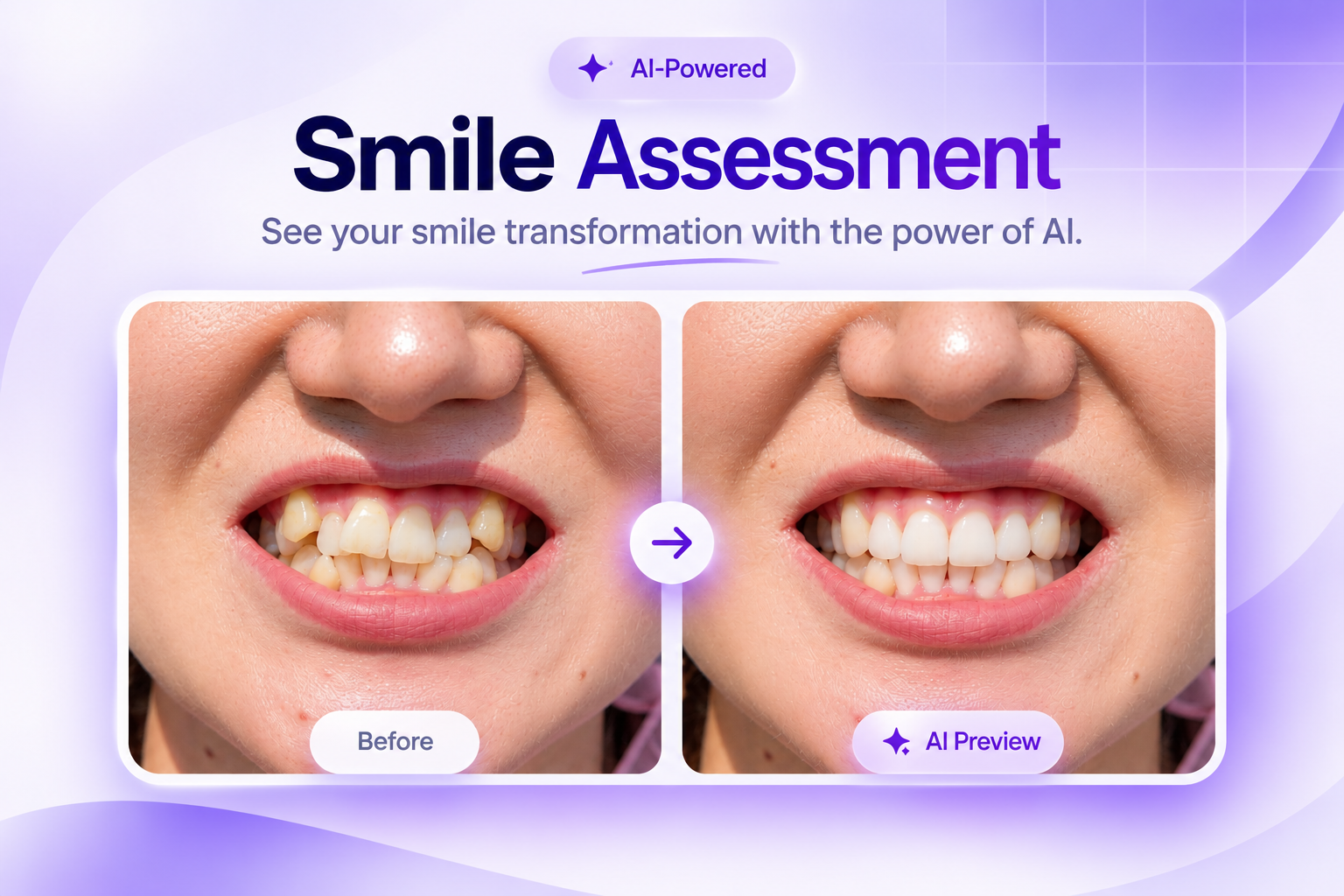
One feature, two places to use it: your website chatbot and Zentri CRM. Patients see an AI-generated preview of how their smile could look, and you get a high-intent lead with the original photo and preview already saved.
On your website
Chatbot: Engage and Assistant
Switch it on from any service step
in the chatbot builder, and edit the prompt, hint and button label.
The visitor uploads a smile photo and leaves their name and an email or phone number.
Consent is captured
before any photo is processed.
They see an illustration of how their smile could look, and the chat ends on that high point.
A lead is created automatically
with the service Smile Assessment, and the original photo and preview are saved on the record.
Inside your CRM
Chairside, in consultations, or after an enquiry
Upload a patient photo
from the Smile Assessment workspace and confirm consent.
Before-and-after compare
to show the difference on screen.
Download
the original and the preview.
Email the preview from the CRM,
with an editable subject and note. The default subject is "Your smile preview".
Patients who have unsubscribed are never emailed.
Daily allowance
shown with its reset time, and previews kept for 30 days.
How the preview is made
Photo checked first.
One real person with teeth clearly visible. Drawings, memes, screenshots, x-rays and animals are refused, and refused photos never use your daily allowance.
A natural result.
The same person, face, age, skin, hair, eyes, lighting, pose and background. Only teeth and gums change: straighter alignment, closed gaps, filled or repaired teeth, an evened gum line and a natural white shade.
Clear expectations.
Previews are illustrations, not clinical predictions of treatment results.
Accepted formats:
JPEG, PNG and WebP, up to 10MB.
Zentri Voice AI
The receptionist who never misses a call
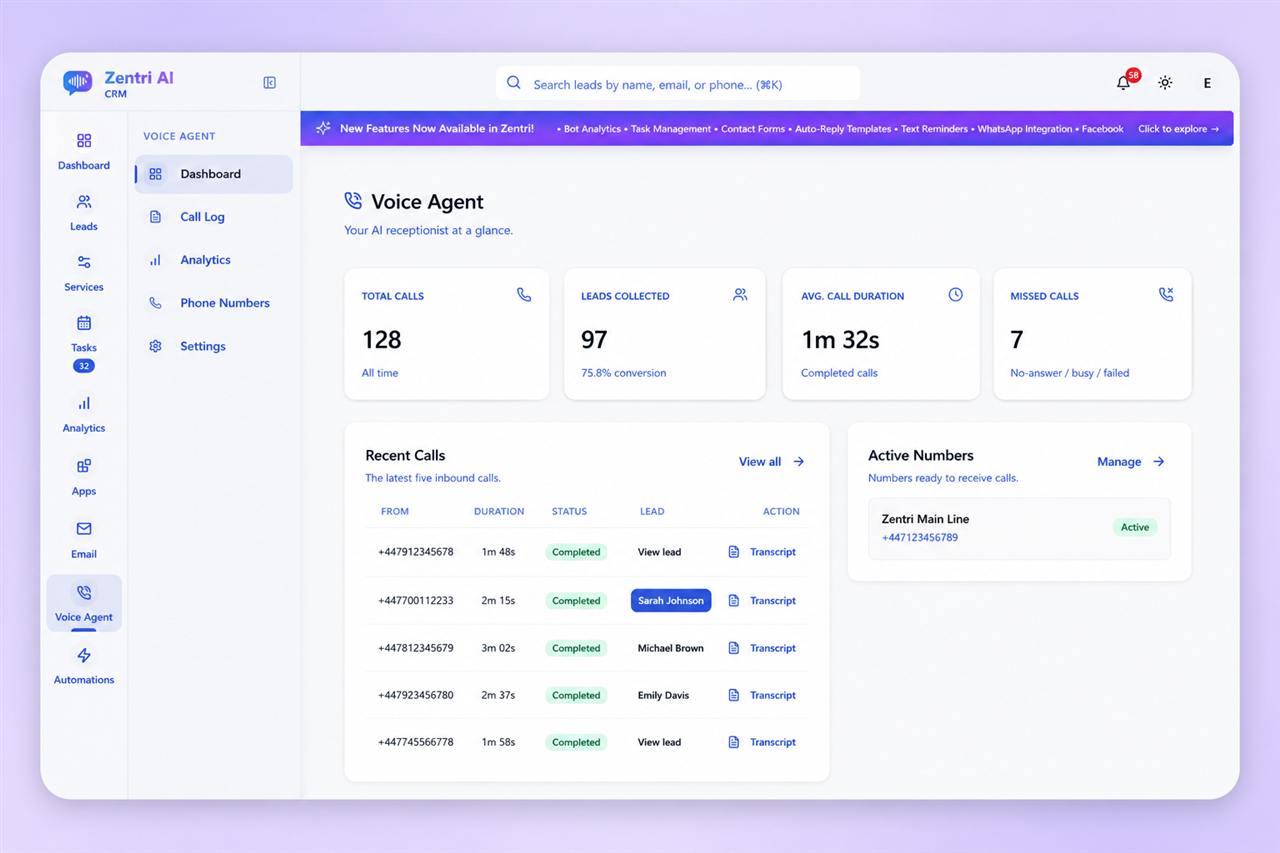
Zentri Voice AI answers the practice numbers you connect in Zentri, around the clock, in the personality you choose. Every caller becomes a lead in your CRM, with the transcript, summary and recording attached.
Answers every call
on the practice numbers you connect in Zentri, with your greeting, your sign-off and the personality you choose.
Knows your practice
from its own knowledge base of treatments, pricing, team, parking and anything else callers ask.
Turns callers into leads
in Zentri CRM, with the source set to Voice and a follow-up task for your team.
Shows you every call
with speaker-labelled transcripts, AI summaries and recordings.
Everything in Voice AI
Call handling, the knowledge base, lead capture, call records, analytics and privacy controls.
Pick up every call
Inbound call answering
on the phone numbers you connect in Zentri.
Your greeting, your sign-off.
Set the opening line and the ending line.
Choose a personality:
friendly and welcoming, professional and direct, casual and conversational, or empathetic and caring.
Business hours and after-hours messages
so callers always hear the right thing.
Maximum call length
to keep control of every conversation.
Knows your practice inside out
A knowledge base for voice
made of searchable sections for treatments, pricing, team, parking and anything else callers ask. It is separate from the chatbot knowledge base.
Practice rules
keep behaviour separate from facts, so you can change how the agent acts without rewriting what it knows.
Pre-loaded topics
(up to five) are read before the caller says a word, so the agent starts every call informed.
Instant updates.
Edit the knowledge base and the agent is synced.
Capture every caller as a lead
Collects name, phone, email and the service they want, with every prompt editable.
Creates the lead in Zentri CRM automatically, with the source set to Voice.
Creates a follow-up task for your team.
Texts your booking link straight after the call, when you have set one, so interested callers can book while the conversation is fresh.
Total call visibility
Call log
with search, and filters for answered or missed, and with or without a lead.
Speaker-labelled transcripts
(caller and agent), searchable across every call.
AI call summaries:
key points, intent, outcome and whether follow-up is needed.
Intent and outcome tagging:
new patient registration, appointment booking, general enquiry and complaint; lead captured, callback required, information provided and no action.
Recordings
you can play from the list and download.
Export transcripts
as text, PDF or JSON.
Recording retention.
Recordings are removed after the retention period (60 days by default). Transcripts and summaries are kept.
Voice analytics
Calls, answered, missed, leads collected, call-to-lead rate, talk time and average duration.
A day-and-hour heatmap of when calls come in.
Trends against the previous period.
Privacy by design
Call recording can be switched on or off.
Processing can be hosted in the EU.
Call audio can be excluded from provider model improvement.
Connect every channel
Everything lands in Zentri CRM, on the lead it belongs to.
Website forms
A webhook per account with automatic field detection. Guides for Elementor, Contact Form 7, Gravity Forms, WPForms, Wix, Webflow and custom HTML.
Website chatbot
One script tag. Guides for WordPress, Wix and Shopify.
WhatsApp Business
Connect with embedded signup, reply from the lead, send approved templates and set an account-wide auto-reply.
Facebook
Connect pages, reply to Messenger from the lead, and capture Lead Ads with every form answer stored. The service is picked up from the campaign name, the form or an answer.
Instagram
Connect a professional account and reply to messages from the lead.
Google Analytics (GA4)
Website sessions in Lead analytics and chatbot visitor data in Chatbot analytics, plus ready-to-use event names.
Meta lookalike audiences
Leads in the statuses you choose, with a name, email and phone, are sent to Zapier, and Meta builds the lookalike audience from them. Each lead is sent once, with automatic retries.
Partner systems
A secure API for the practice software and phone system you already use. Leads and calls come in with that system as the source.
Partner API highlights
Existing leads are matched by phone, then email, so nothing is duplicated.
Treatments map to your services and prices.
Repeat submissions never create a second lead.
Finished calls store the outcome, a summary note and a recording link.
A live phone lookup tells a ringing call whether the caller is already a lead.
Your data, handled with care
Role-based access
so staff only see what they need.
Private file storage
for patient photos and attachments.
Explicit consent
captured before any smile photo is processed.
Unsubscribes respected
across email, including Smile Assessment emails.
Audit trail
of account actions.
Recoverable deletes
with a 30-day trash.
EU-hosted voice processing
available, with call audio excluded from provider model improvement.
Ready to see Zentri in action?
Book a demo and we'll show you the voice agent, chatbot and CRM running on your own treatments and prices.